Audience Performance
Audience Performance helps you evaluate the performance of your order throughout its flight period. To view the audience delivery information for your orders, select an order and navigate to the 'Audience Performance' tab within the order details.
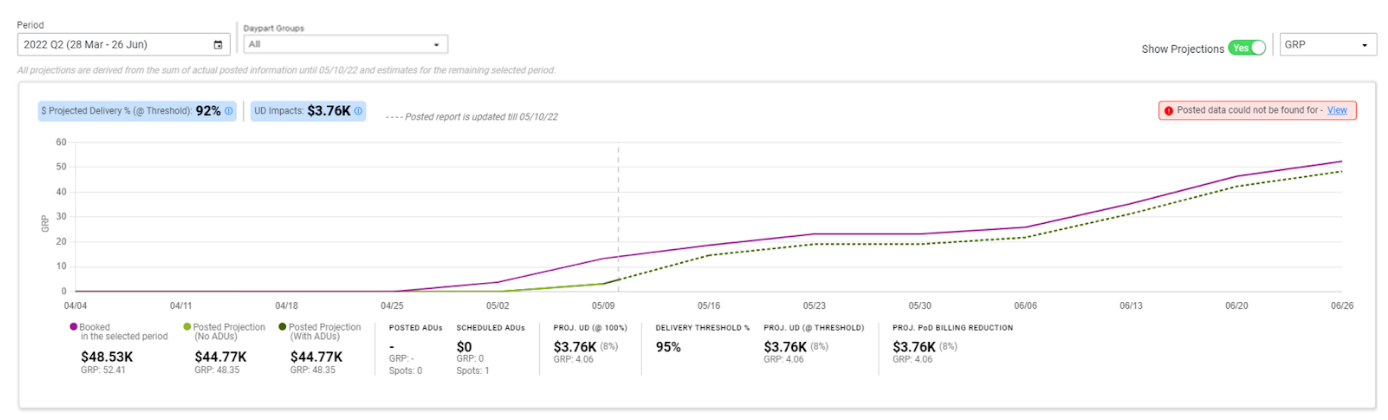
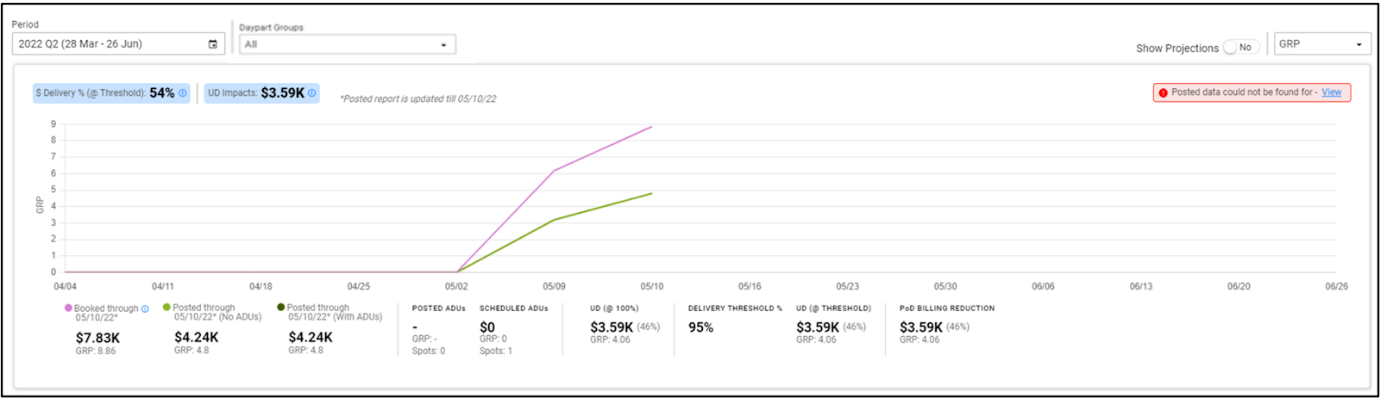
You now have the option to view the performance of your order until the last posted date or projection of the audience performance for the entire selected period by switching the 'Show Projections' toggle to 'Yes'.
Filtering
You can choose the period for which you want to view the audience performance of the order using the period selection filter. You can view the data specific to certain dayparts by selecting a daypart group from the dropdown provided they are added under the business rules. Additionally you can also choose the Order metric to view the data based on Impressions or GRP.
The '$ Delivery %(@Threshold)' or '$ Projected Delivery % (@Threshold)' indicates the ratio of net realizable or projected $Value to the $Value of Booked through 'posted date' expressed in terms of percentage.
The 'UD Impacts' section shows the dollar value impact of under-delivery (UD) to the station. This includes the ADUs provided at no-charge, C/F UD liability for P4S orders or the billing reductions for PoD orders.
What the tab shows
On the 'Audience Performance' tab, you will find the following information.
If 'Show Projections' is set to 'No':
- Booked through 'posted date': Displays the Booked $Value and GRP/IMP('000) of the order, based on the selected period up to the posted date. Please note that the Booked data is for posted spots only.
- Posted through 'posted date' (No ADUs): Displays the Posted $Value and GRP/IMP('000) for the order, excluding ADUs, based on the selected period up to the posted date.
- Posted through 'posted date' (With ADUs): Displays the Posted $Value and GRP/IMP('000) for the order, including ADUs, based on the selected period up to the posted date.
If 'Show Projections' is set to 'Yes':
- Booked in the selected period: Displays the Booked $Value and GRP/IMP('000) of the order within the period selected in the filter.
- Posted Projection (No ADUs): Displays the projected $Value and GRP/IMP('000) for the order, excluding ADUs, calculated using the posted information for all posted spots and estimated projections for all remaining spots.
- Posted Projection (with ADUs): Displays the projected $Value and GRP/IMP('000) for the order, including ADUs, calculated using the posted information for all posted spots and estimated projections for all remaining spots.
The data is presented in the form of a graph, allowing you to visualize the performance over time. You can hover over specific dates on the graph to view the corresponding data for that particular date.
The ADUs in the selected period are divided into two sections:
- Posted ADUs: The $Value, spots count and GRP/Imps('000) of the posted ADUs.
- Scheduled ADUs: The estimated $Value, spots count and GRP/Imps('000) of ADUs scheduled after the last posted date.
Under-delivery and Over-delivery
The page highlights the performance of the order and classifies it as either Under-delivery or Over-delivery based on the following conditions:
- If Booked (GRP/Imps) - Posted (GRP/Imps) (with ADUs) - Scheduled ADUs (GRP/Imps) is positive — Under-delivery (UD).
- If Booked (GRP/Imps) - Posted (GRP/Imps) (with ADUs) - Scheduled ADUs (GRP/Imps) is negative — Over-delivery (OD).
If 'Show Projections' is set to 'No':
- UD (@100%): Displays the total $value, percentage (based on $value), GRP/IMP('000) of the order that has under-delivered compared to the booked GRP/IMP('000), without considering any threshold.
- DELIVERY THRESHOLD%: Displays the threshold percentage set in the business rules of the order.
- UD (@THRESHOLD): Displays the total $value, percentage (based on $value), GRP/IMP('000) and the minimum liability percentage. This represents the liability to the station as they are below the permitted audience delivery limit set in the business rules of the order.
- C/F UD LIABILITY: Displays the station's liability carried forward when the UD (@Threshold) is greater than 0, while still allowing the station to receive full booked value. This applies exclusively to P4S orders.
- PoD BILLING REDUCTION: Displays the reduction in billing when the UD (@Threshold) exceeds 0, resulting in a decrease in payment to the station. This applies exclusively to PoD orders.
- UNPAID OD (>100%): Displays the total $value, percentage (based on $value), GRP/IMP('000) of the order that have over-delivered compared to the booked GRP/IMP('000), at an order level.
If 'Show Projections' is set to 'Yes':
- PROJ. UD (@100%): Displays the total projected $value, percentage (based on $value) and the GRP/IMP('000) of the order potentially under-delivered. These values are derived from the actual posted information and ANNA estimates without considering any threshold.
- DELIVERY THRESHOLD%: Displays the threshold percentage set in the business rules of the order.
- PROJ UD (@THRESHOLD): Displays the total $value, percentage (based on $value), GRP/IMP('000) and the minimum liability percentage. This represents the liability to the station as they are below the permitted audience delivery limit set in the business rules of the order.
- PROJ. C/F UD LIABILITY: Displays the station's liability carried forward when the Projected UD (@Threshold) is greater than 0, while still allowing the station to receive full booked value. This applies exclusively to P4S orders.
- PROJ. PoD BILLING REDUCTION: Displays the reduction in billing when the Projected UD (@Threshold) exceeds 0, resulting in a decrease in payment to the station. This applies exclusively to PoD orders.
- PROJ. UNPAID OD (>100%): Displays the total projected $value, percentage (based on $value) and the GRP/IMP('000) of the order potentially over-delivered. These values are derived from the actual posted information and ANNA estimates.
- Metrics are displayed based on whether the order is P4S or PoD and whether the audience performance is under-delivered or over-delivered.
- The $Value of Over-delivery is a notional value. In case of over-delivery, the Buyer is not obligated to provide compensation to the Seller.
- The under-delivery or over-delivery for Payment on Delivery (PoD) orders will not be displayed after the order is completed.
- Bonus Spots (P-14 BON) are not included in the calculations of the Audience Performance.
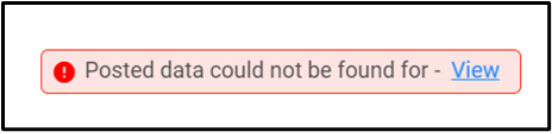
In case the posted data is not available before the 'posted through' date and for the 'Posting type' of the order, you can review the specific dates by clicking on 'View' in the 'posted data could not be found for' section at the top right corner of the card.
For order type 'No Aud Posting', the business rule is set to 'No' for providing ADUs. So for these orders, you won't see any UD or OD section in the audience performance card since ANNA won't be acting on the under-delivery to provide offers.
- The latest date till which the posted data for the order was received, is also displayed.
- The Audience Performance tab will not be available for 'Paid' orders.