Line Details
To view the line information for an order, select an order from the order listing page and navigate to the 'Line Details' tab. You can find detailed information for the order such as the Inventory Codes, display dates, days, times, dayparts, rates, ratings, impressions and the total number of spots in the line as per the latest revisions.
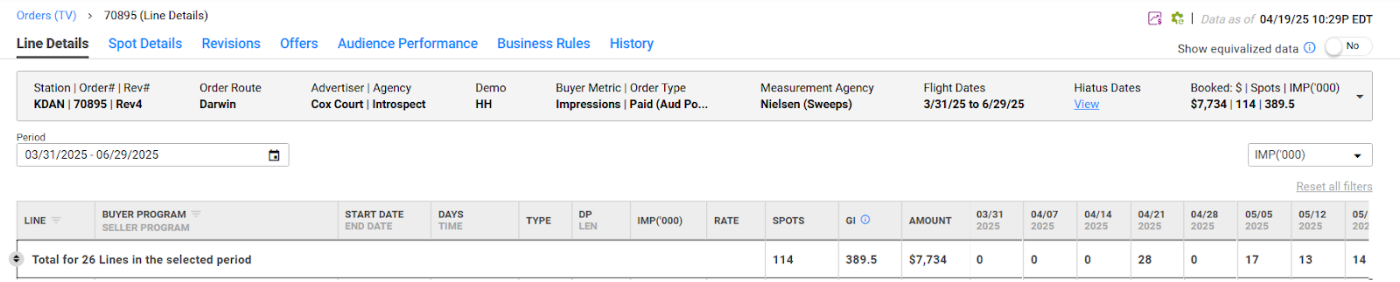
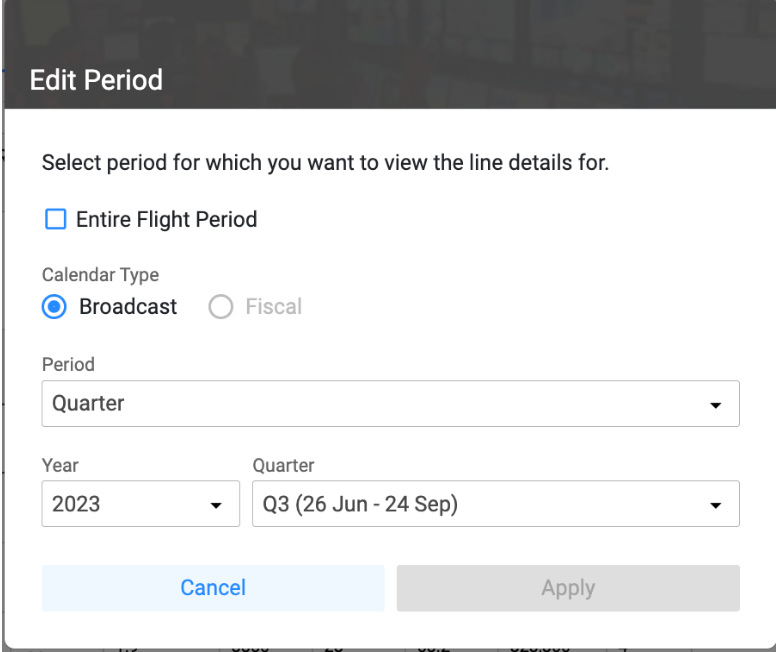
The line information is presented in a comprehensive manner along with the total number of spots played per week. You can view the information for the desired quarter, month or even the entire flight period of the order. This will give you an idea of the total count of spots, the dollar amount and total ratings in a particular period.
Easy filters

For non-electronic orders, you can make use of easy filters to quickly filter out 'Ordered lines' which are the originally ordered lines of the order and 'ADU lines' which are newly added lines containing ADU spots and view the information for the same.
Sub-lines

The lines that contain spots with different values for Inventory Code, spot length, daypart rate or rating, are presented in a well segregated manner to show the unique group of spots. EOS groups the spots having these different values for the line parameters as sub-lines within the same line so that you can easily glance at the varying spot information within a line. For non-electronic orders, you can view these sublines by setting the "Merge sub-lines" toggle to 'No'. The sub-lines belonging to the same line will have the same line number.
You can also use the column level filters to filter out a particular line number, Inventory Code or Buyer Program Name.
Metric dropdown
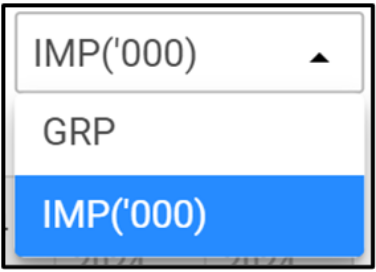
You can select the metric to view the line details data, such as GRP/Impressions, using the metric dropdown provided at the top right corner. The primary metric of the order will be selected by default.
Line Details table
| Column | Description |
|---|---|
| LINE | Non-electronic orders: the WO Traffic line number. WOC/Medialine/Darwin orders: the Buy Line number. |
| SELLER PROGRAM | The Seller Program name used for the line. (Rep/Electronic orders) |
| INVENTORY CODE | The Inventory Code used for the line. |
| BUYER PROGRAM | The Buyer Program Name used for the line. (Rep/Electronic orders) |
| START DATE | The start date for the line. |
| END DATE | The end date for the line. |
| DAYS | The eligible telecast days of all the spots in the line. |
| TIME | The eligible start and end time the line's spots are scheduled to play at. |
| TYPE | The spot type assigned to all the spots in the Line. |
| DP | The daypart for the line. |
| LEN | The spot lengths for each spot in the line. |
| RTG | The ratings of each spot in the line. |
| IMPS('000) | The impressions of each spot in the line. |
| RATE | The rate of each spot in the line. |
| SPOTS | The total number of spots in the line. |
| GRP | The total booked gross rating points for the line. |
| GI | The total booked gross impressions for the line. |
| AMOUNT | The total dollar amount for the line. |
- For non-electronic orders where the lines contain sub-lines, the RTG, IMP('000) and the RATE column values for the main line will be the weighted average of the corresponding values in the sub-lines while the SPOTS, BOOKED GRP, BOOKED GI, PROJ. GRP, PROJ. GI and AMOUNT will be the totals of the sub-lines.
- The values under 'SPOT', 'BOOKED GRP', 'BOOKED GI', and 'AMOUNT' columns change based on the period selected.
- The 'RATE', 'SPOTS', 'BOOKED GI/GRP' columns and the total values will update to display equivalized values when the equivalization toggle is set to 'Yes'.