Business Rules
In order to navigate to the Order Business Rules, you will need to search for the order or select the order from the listing page, proceed to the order details page and select the 'Business Rules' tab.
The Order Business Rules are similar to the Advertiser Business Rules. The Business Rules for a particular order can be set and approved here.
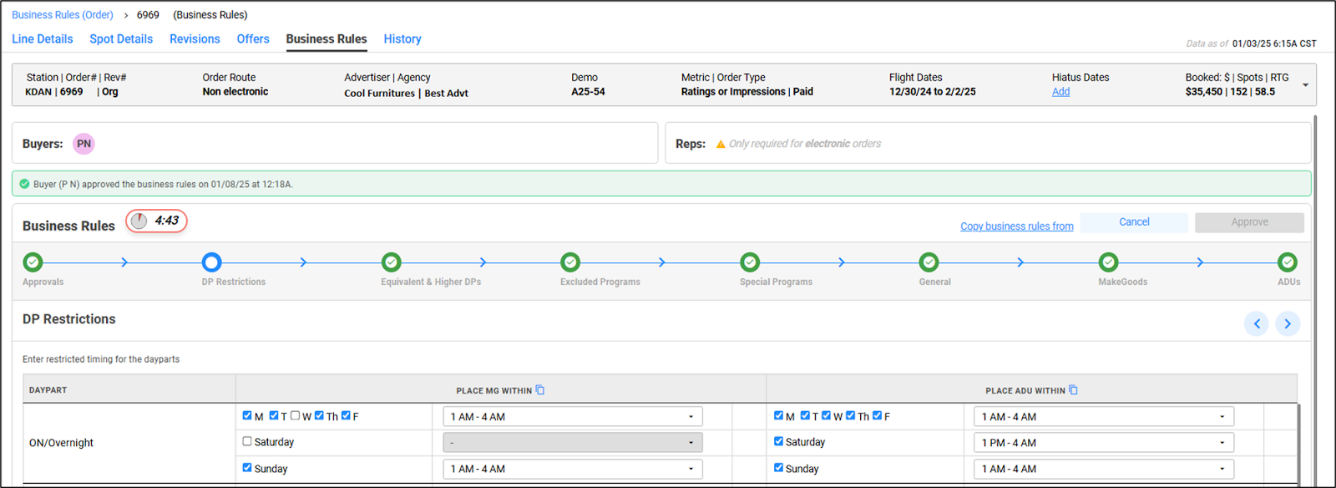
The Seller approves and shares the Advertiser and the associated Order Business Rules with the Buyer. The Buyer can then review, edit or approve the business rules as required.
The approved orders can be further edited by the seller and buyer as needed. These rules will be used to provide offers from the next revision cycle.
You can access all the relevant Orders that require your attention in one place by going to the Order tab under the Business Rules menu. There, you'll have the option to select the Orders based on the ownership group and the station.