Offers
This tab displays all offers suggested by ANNA and created by users, including details like offer status, buyer program name, inventory code, estimates, and user actions. Only offers in their final states are shown and temporary offers are excluded.
You can view details by your preferred metric and filter offers by status using the provided easy filters, such as:
- Confirmed
- Cancelled
- SM Approved
- SM Rejected
- Buyer Timedout
- Buyer Rejected
- ANNA
- Seller User Revision
note
- Rejection comments, if any, are displayed next to each offer.
- If there is any manual intervention, ANNA will not continue with the entry process and the appropriate status (user confirmed, user cancelled, user edited etc) will be displayed.
Offers table
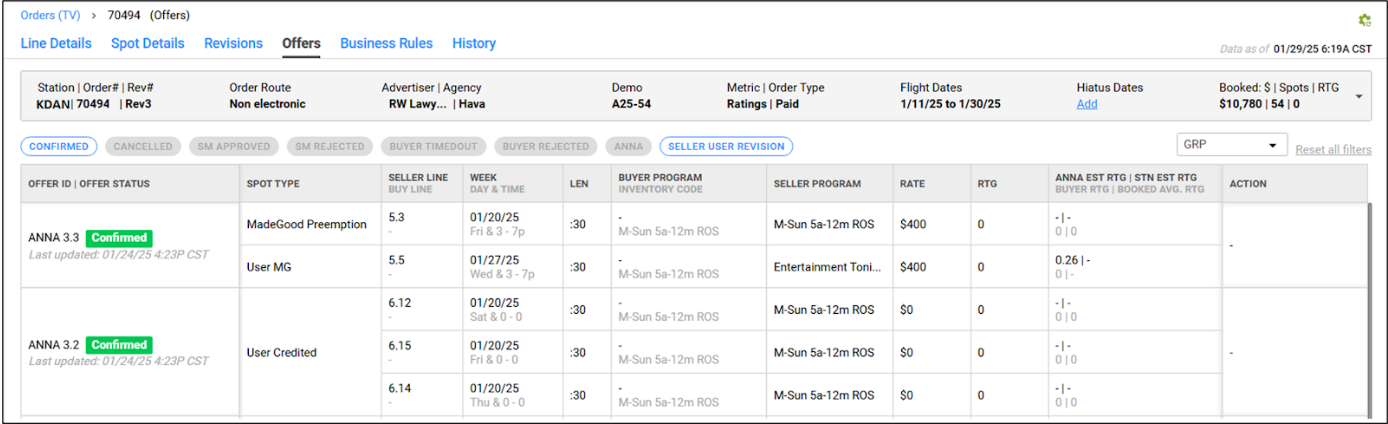
| Column | Description |
|---|---|
| OFFER ID | The Offer ID received from the rep platforms. Incremental offer IDs are provided for non-electronic orders. The prefix of the offer ID indicates its source. |
| OFFER STATUS | The current status of the offer. Possible values: Seller Approved, Buyer Pending, Buyer (Rep) Pending, Buyer (Agy) Pending, Buyer Approved, Buyer Rejected, Buyer Timed-out, Buyer Timed-out (Log closed), SM Pending, SM Approved, SM Rejected, WOT Entry in Progress, WOT Entry Failed, WOT Entry Failed (retrying…), Confirm in Progress, Confirmed, Cancel in Progress, Cancelled, Cancelled: SM Rejected, Recall in Progress, Recalled, User Confirmed, User Cancelled, User Edited, User Edited & Confirmed, User Edited & Cancelled, User Station Cancelled. |
| SPOT TYPE | The spot type. Possible values: Offered MakeGood, Offered ADU, Offered MakeGood: Auto-approved, Offered ADU: Auto-approved, Rejected MakeGood, Rejected ADU, Outstanding Preemption, Outstanding Preemption: Marked for Credit, Preemption: Marked for Credit, Added MakeGood, Unresolved. |
| SELLER LINE | The line number for the spot on WO Traffic. |
| BUY LINE | The line number for the spot on Rep/Buyer tool. |
| WEEK | The date of the week where the spot is to be placed. |
| DAY & TIME | The day of the week and the time interval in which the spot is scheduled. |
| LEN | The duration of the spot. |
| BUYER PROGRAM | The Buyer Program Name for the spot. |
| INVENTORY CODE | The Inventory Code for the spot. |
| SELLER PROGRAM | The Seller program name for the spot. |
| RATE | The booked rate of the spot. |
| AVG RATE | The average rate of each spot calculated among all orders on the station against the given spot length for the order specific demo for that given week. |
| RTG | The booked ratings for the spot. |
| IMPS('000) | The booked impressions for the spot. |
| ANNA EST RTG | ANNA calculated ratings from the historical data. |
| STN EST RTG | The estimated ratings for a specific program by the station. |
| BUYER RTG | The booked ratings for the spot. |
| BOOKED AVG. RTG | The average rating of each spot calculated among all orders on the station against the given spot length for the order specific demo for that given week. (Order metric: GRP) |
| ANNA EST IMPS('000) | ANNA calculated impressions from the historical data. |
| STN EST IMPS('000) | The estimated impressions for a specific program by the station. |
| BUYER IMPS('000) | The booked impressions for the spot. |
| BOOKED AVG. IMPS('000) | The average impressions of each spot calculated among all orders on the station against the given spot length for the order specific demo for that given week. (Order metric: Impression) |
| DP | The daypart for the spot. |
| REV CLASS | Revenue classification code. |
| BIZ RULE | Type of Business Rules: Standard/Relaxed/Diluted. |
| LAST ACTION BY | The user who performed the most recent action. |
| ACTION | Action to be taken on the suggested spots. |